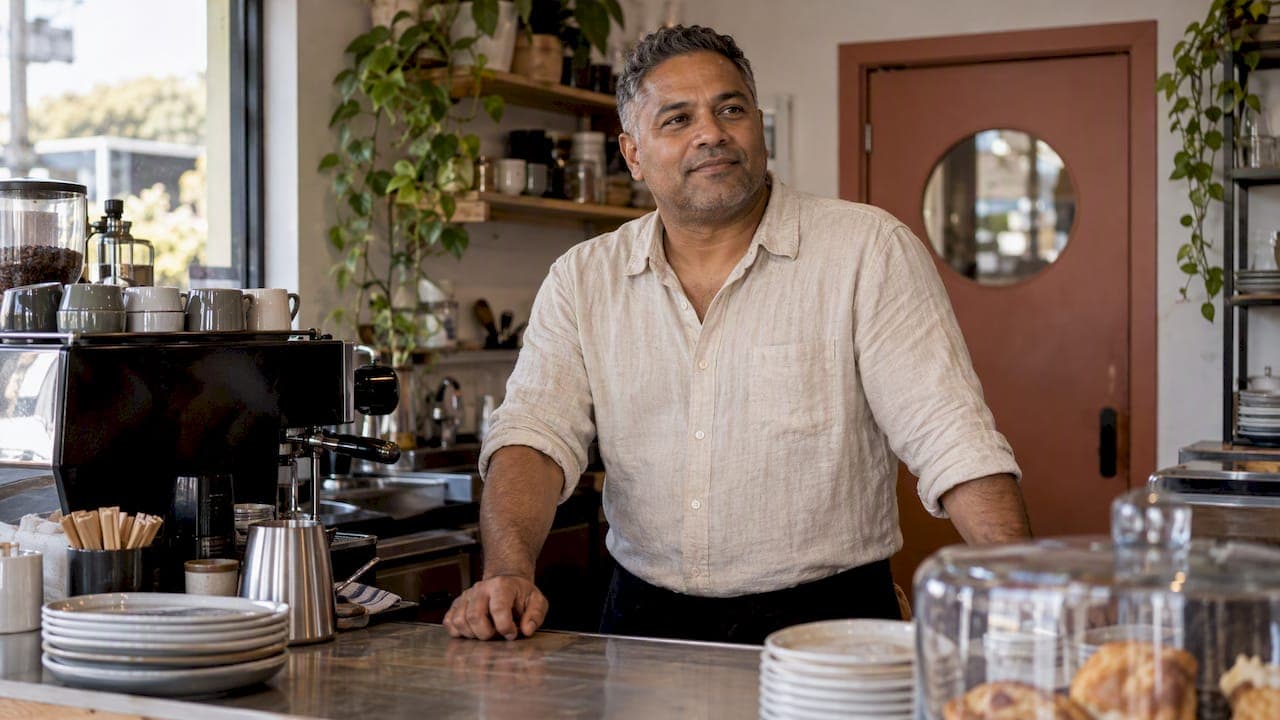
The best photoshoot ideas for a small business are the ones that answer a question your customer is already asking: who am I dealing with, what will it be like to work with them, and what will I get? That means a portrait of you, a photo of your team, images of the work being done, your premises, and the details that show your standards. Below are twelve shots we plan with Auckland business owners, how to make them look natural, and how to get one shoot to feed your website, Google profile and social media for a year or more.
TL;DR
- Start with three essentials: an owner portrait, a team photo and an "at work" image. Add the rest as budget allows.
- Plan each photo around where it will be used (About page, Google Business Profile, service pages, social posts), not around a vague wish for "nice pictures".
- Shoot both landscape (for website banners with text) and portrait (for social) versions of your key frames.
- Natural beats posed: let people carry on working, and use soft window light and simple backgrounds.
- A professional brand session in Auckland starts at NZ$575, and one well-planned session can cover every idea in this article.
Table of Contents
- Start with where the photos will be used
- 12 photoshoot ideas for a small business
- Match the idea to your type of business
- How to make business photos look natural
- Plan the shoot so nothing is wasted
- Photos for your Google Business Profile
- DIY or professional: what makes sense?
- What a brand photoshoot costs in Auckland
- Our perspective: what we see on set
- Book a brand shoot that covers the whole list
- FAQ
- Sources
Start with where the photos will be used
Most small business owners begin with the camera. We suggest beginning with a list of places that need images. A shot list built around uses stops you paying for 200 photos and finding you have nothing for your homepage banner.
A practical list of uses looks like this:
- Website homepage: one wide, welcoming image, ideally with space for a headline.
- About page: you and your team, looking approachable. (We wrote a separate guide on About page photos that convert if this is your priority.)
- Service pages: images showing the work itself, not stock photos of strangers in handshakes.
- Google Business Profile: exterior, interior, team and work photos.
- Proposals, quotes and email signatures: a clean, consistent headshot.
- Social media: vertical images, behind-the-scenes moments and short, repeatable themes.
Write these down before you book anything. The ideas below map onto them neatly.
12 photoshoot ideas for a small business
The order matters. If you only have budget or time for the first three, you will still have a usable set. This sequence also follows the logic of a New Zealand shot list for service businesses, which recommends starting with an owner portrait, a team photo and an at-work image before adding the rest.

1. The owner portrait
People buy from people, especially when they are choosing a tradie, a clinic, a consultant or a café they have never visited. A good owner portrait is warm and clear: your face, your eyes, no heavy filters. Use it on your About page, proposals, LinkedIn and as the face of your social profiles.
If you want a polished version, our headshot sessions start at NZ$345 for The Short one, with The Standard one at NZ$575.
2. The team photo
Even a team of two deserves one. Aim for relaxed rather than lined-up. Group people close together, angle shoulders slightly inward and vary head heights so the frame does not look like a police line-up. Laughing at something real works better than a forced "say cheese".
3. The "at work" image
Ask the person to carry on as normal: measuring, typing, plating, fitting, consulting. Do not ask them to look at the camera. This is often the most valuable frame on a service page, because it shows what you actually do and how you do it.
4. Hands at work
Close-up shots of hands doing the job (a plumber's tools, a baker kneading, a bookkeeper with a calculator) are quietly powerful. They show skill without needing a face, so they are useful for social posts and banners where you want a clean, uncluttered image.

5. The premises, inside and out
Customers want to know what they are walking into. Shoot the exterior so they recognise it when they arrive, then the interior at its best: tidy, well lit, daylight on. If you work from a van or home office, a vehicle with signage or a neat workspace does the same job.
6. Detail shots
Tools, signage, packaging, fabrics, the coffee machine, the branded notebook. Details add texture to a website and give you a stock of images that do not depend on anyone's schedule. They are also easy to crop for different platforms.
7. Before-and-after images
If your work transforms something (a renovation, a garden, a haircut, a cleaned kitchen), a before-and-after pair is among the strongest proof you can show. Take the "before" at the same angle and in similar light as the "after" so the comparison is fair.
8. Customer interaction
A consultation, a handover, a fitting, a tasting. These images show how you treat people. Always get the customer's clear permission first. Our guide on brand photoshoot planning and privacy for NZ small businesses covers how to handle consent properly, including for staff and clients who appear in your images.

9. Behind-the-scenes moments
Setting up in the morning, packing orders, a team meeting, a quick coffee between jobs. These are the shots that make social media feel human. They also happen naturally during a longer session, which is why a half-day booking often yields more usable content than a short one.
10. The product or the result
For a product business, this is the core: clean, well-lit images of what you sell. For a service business, the equivalent is the result, such as a finished deck, a plated meal, a completed website on a laptop screen, or a happy client holding their new keys.
11. The wide establishing shot
One wide image of you in your environment, with empty space where a headline can sit. This is your homepage hero. Shoot it in landscape orientation and keep the subject to one side.
12. Lifestyle portraits
A looser portrait of you away from the desk: walking through your workspace, talking with a colleague, standing in the doorway. Lifestyle portraits fill the gap between a formal headshot and a work image, and they are ideal for newsletters and social posts.
For more brainstorming, photo content ideas for business owners is a good way to stretch the list into themes you can post throughout the year.
Match the idea to your type of business
Not every business needs all twelve. Here is how we would prioritise.
| Business type | Prioritise | Skip at first |
|---|---|---|
| Tradie or home services | Owner portrait, at-work, before-and-after, vehicle/signage | Lifestyle portraits |
| Café or retail | Premises, product, details, team | Before-and-after |
| Consultant, coach, accountant | Owner portrait, lifestyle portraits, customer interaction | Hands at work |
| Fitness trainer or studio | Action shots, client sessions, premises | Detail shots |
| Creative or maker | Product, hands at work, behind-the-scenes | Team photo (if solo) |
If you are a trainer, dynamic images matter more than anything. Our fitness photography packages start with The Mini Shoot at NZ$460, The Standard Shoot at NZ$570 and The Premium Shoot at NZ$800.
How to make business photos look natural
The most common complaint we hear is "I do not know how to pose". The good news is that you should not need to. Here is what works.
Use soft light and a simple background
For a portrait, stand facing a window, about one to two metres away, with a plain wall or uncluttered space behind you. Hold the camera at eye level. A New Zealand shot list for service businesses gives the same advice for DIY owner portraits, and it holds for a professional shoot as well: window light is flattering and forgiving.
Shoot in two orientations
Take each key frame in landscape (for website banners and Google images with space for text) and in portrait (for Instagram stories, Reels covers and Facebook posts). It costs you nothing extra on the day and saves a lot of awkward cropping later.
Give people something to do
A stiff smile at a lens is the hardest photo to take well. A conversation, a task or a walk gives hands and faces a purpose. This is why we always build a few minutes of movement and conversation into a session, whatever the package.
Wear what you wear to work
Choose outfits that suit your brand and that you would happily rewear. Solid colours and simple layers photograph better than busy patterns. Check that your clothing is clean, pressed and comfortable, because discomfort shows in your shoulders and your expression. If you wear a uniform, wear it.
Keep it consistent
Pick a look (bright and airy, dark and moody, warm and earthy) and stay with it. Consistent colour and lighting make a mixed bag of images look like one brand. If you are also working on your wider brand identity, Business.govt.nz's guide to creating your brand suggests getting help from a professional logo designer and a brand advisor where you can, and keeping logos simple and flexible. The same logic applies to photography: simple and flexible images are easier to reuse.
Plan the shoot so nothing is wasted
A planned shoot is a calmer shoot. This is the process we follow with Auckland clients, and you can follow it whether you hire someone or do it yourself.
- List your uses. Homepage, About, services, Google profile, socials, proposals.
- Choose the shots. Pick from the twelve above and write a short list, with the top three in bold.
- Pick the location. Your workspace, a shared studio, or a place that suits your brand. Consider parking, noise and access.
- Prepare the space. Tidy surfaces, remove stray cables and paperwork, and take down anything with another business's branding or private client details.
- Brief your team. Tell staff what is happening, what to wear and that they can opt out. Get written consent for anyone who will appear.
- Choose the time of day. Window light is best mid-morning for many north- and east-facing spaces. Avoid peak service times if customers will be in shot.
- Allow time for natural moments. Do not cram every idea into 30 minutes. A half-day gives room for behind-the-scenes and candid work.
- Plan how you will use the images. Name the files sensibly and keep a folder for each use.
If you are changing your brand identity at the same time, our rebrand photoshoot checklist for NZ small businesses helps you capture shots you can actually use.
Photos for your Google Business Profile
For local businesses, this is where many customers will first see you. Google's own guidance recommends category-specific photos, at least three each of the exterior, interior, product, representative-at-work and team, and says images should be in focus, well lit and an honest representation of reality. In practice, that means no heavy filters, no stock images and no photos that make your premises look bigger or newer than they are.
The same page gives technical specifications: photos should ideally be JPG or PNG, between 10 KB and 5 MB, with a recommended resolution of 720 x 720 pixels. A professional shoot comfortably exceeds these, so you can simply resize the files you receive.
Build your Google set from the ideas above:
- Exterior: the front of your premises, the signage and the entrance, plus the street view if parking is part of finding you.
- Interior: the main customer area, any waiting space and the workspace at its best.
- Product: your best-selling products or results.
- At work: a team member doing the job.
- Team: a relaxed group image.
Upload a few at a time, and refresh them as your premises or team change.
DIY or professional: what makes sense?
Phone photography is perfectly fine for behind-the-scenes content, quick product updates and day-to-day social posts. Use natural light, clean your lens and shoot a few frames of each setup.
Hire a professional for the images that carry your reputation: the owner portrait, the team photo, the homepage hero and anything that will be printed, used in advertising or reused for years. A photographer also directs people, which is the part owners find hardest. You cannot easily photograph yourself, and nobody relaxes when they are trying to hold a phone at arm's length.
A good rule: use a professional for the 10 to 20 images that will do the most work, and use your phone for everything else, in a style that matches.
What a brand photoshoot costs in Auckland
The question "how much should I charge or pay for a business photoshoot?" depends on how many setups, locations and finished images you need. Our published packages, all one-off prices in New Zealand dollars, are:
| Package | Best for | Price |
|---|---|---|
| The Short one (headshots) | A fast, professional portrait | from NZ$345 |
| The Standard one (headshots) | Headshots with more variety | NZ$575 |
| Starter Brand Session | Small businesses needing core brand images | NZ$575 |
| Signature Brand Session | Owners wanting a broader library of images | NZ$1035 |
| Complete Brand Session | The full set: portraits, work, details | NZ$1495 |
| Half day Office photoshoot | Teams and workplaces | NZ$2300 |
See the personal branding packages for what each one includes, and our headshot page for team and office options. If you are planning a launch event or team day, we also offer event photography, with events from NZ$345.
As a guide, the Starter session suits a sole trader who needs a portrait and a few work images. The Signature and Complete sessions suit owners with a team, premises or a product range to show.
Our perspective: what we see on set
We have photographed a lot of Auckland business owners, and the same thing happens nearly every time. They arrive worried about being photographed, and they leave surprised that the best frames were the ones where they forgot the camera was there. We do not expect anyone to know how to pose. Our job is to plan carefully, give clear guidance and keep the mood relaxed, so that the images look like you on a good day rather than you in front of a lens.
We also see business owners overspend on the wrong thing. They book a long session for dozens of near-identical headshots and end up with nothing for their service pages. The better investment is variety: one strong portrait, a team frame, a few at-work moments, some details and a wide hero image. That set will cover a website, a Google profile and months of social posts.
If you are camera-shy, choose a photographer based on how they make you feel in the first ten minutes of a conversation, not just on their portfolio. Our portfolio and personal branding portfolio show the style, but the feeling on the day is what makes the photos look genuine.
— Rowan Freeman
Book a brand shoot that covers the whole list
If you would rather not coordinate all this yourself, we can build the shot list with you and photograph it in one session, in your workspace or in our choice of Auckland locations. Browse the personal branding sessions to see which one fits, or get in touch and tell us about your business, and we will suggest the right package.
FAQ
What photos does a small business need first?
Start with an owner portrait, a team photo and an image of you or your staff at work. These three cover your About page, Google profile and proposals. Add premises, details and customer interaction shots afterwards.
How many photos should I get from one session?
That depends on the package and how many setups you plan. Rather than counting images, count uses: one hero image, one portrait, a team shot, several work and detail frames, and a set of social-friendly vertical images. If you can name where each photo will go, you have the right amount.
Can I use my phone for business photos?
Yes, for everyday social content, behind-the-scenes images and simple product updates, as long as the light is good and the lens is clean. For your owner portrait, team photo and homepage hero, a professional photographer will give you sharper, more consistent and more flattering results.
Do I need permission to photograph staff and customers?
Yes, get clear consent before anyone appears in marketing images, and let people opt out without pressure. Our guide to brand photoshoot planning and privacy explains how to handle it for New Zealand small businesses.
How much does a small business photoshoot cost in Auckland?
Our brand sessions are NZ$575 for the Starter Brand Session, NZ$1035 for the Signature and NZ$1495 for the Complete session. Headshots start from NZ$345, and a half-day office photoshoot is NZ$2300.
Sources
- Tips for business-specific photos on your Business Profile (Google Business Profile Help)
- Creating your brand (Business.govt.nz)
- The 12 photos every service business needs (C i Marketing)
- Photo Content Ideas for Business Owners in 2026